
Premium TradingView Indicator
One workflow for key levels, pressure signals, and volume context.
The Dobrusky Price Action Engine helps traders map important levels, identify bullish and bearish pressure signals, and read volume context in one clean TradingView workflow.
Automatic Key Levels
Plot key session, daily, weekly, monthly, pivot, and gap levels automatically so you know where reaction matters before the trade decision starts.
Pressure Signals
Highlight bullish and bearish pressure using volume, volatility, close location, and bar structure.
Volume Context
Use high-volume and low-volume anomaly markers to spot when participation does not match the price action.
Cleaner Workflow
Replace a cluttered chart stack with one workflow built around location, pressure, participation, and cleaner decision-making.
Built for real chart reading
A cleaner way to read the chart
The Price Action Engine organizes key levels, daily gap context, qualified pressure signals, and volume anomalies into one clean TradingView workflow — so you can read location, pressure, and participation quickly without cluttering the chart.

Why It Works
Built around how intraday decisions actually happen
The Price Action Engine is designed to help answer three questions faster: where price is reacting, whether the bar is showing qualified pressure, and whether volume adds useful context.
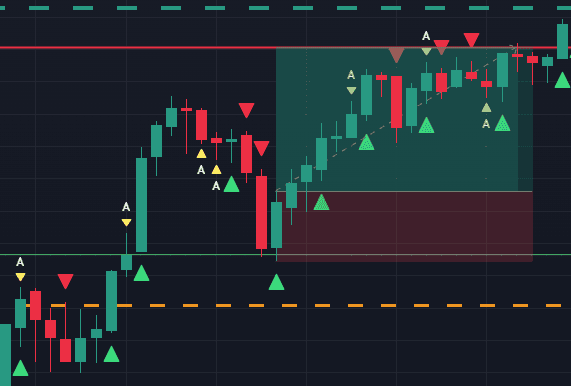
Location matters
Key levels and daily gap structure help define where a reaction is worth paying attention to before the signal marker matters.

Signals show pressure
Triangle markers highlight bars where volume, volatility, close location, and bar structure show evidence of buying/selling pressure. They are context for the trade decision — not automatic entries.

Participation adds context
Volume anomaly markers help show when participation and price action are out of sync, adding context around continuation, exhaustion, or failed movement.
Core Features
What is included on the chart
Everything is built to support one clean workflow: map the important levels, read qualified pressure signals, and use volume context to make faster chart decisions.
Automatic key levels
Track important daily, weekly, monthly, pivot, and opening print levels automatically so broader market context stays visible without manual chart work.
Intraday reference levels
Plot premarket high/low, opening range high/low, daily open, and previous-session levels so the main intraday decision points stay visible.
Daily gap structure
Automatically show active daily gap zones and boundaries so potential reaction areas and target context are easier to read.
Qualified signal markers
Bullish and bearish markers highlight pressure bars where price action, volume, and volatility align.
Volume anomalies
Highlight high-volume and low-volume anomalies when participation does not match the candle structure.
Cleaner workflow
Keep levels, gap context, signal markers, and volume clues in one chart workflow instead of juggling separate scripts.
Built by a Trader and Developer
Refined through trading and software discipline
The Dobrusky Price Action Engine was built from years of chart review, intraday trading, and software development — then refined into a cleaner workflow for levels, pressure signals, and volume context.
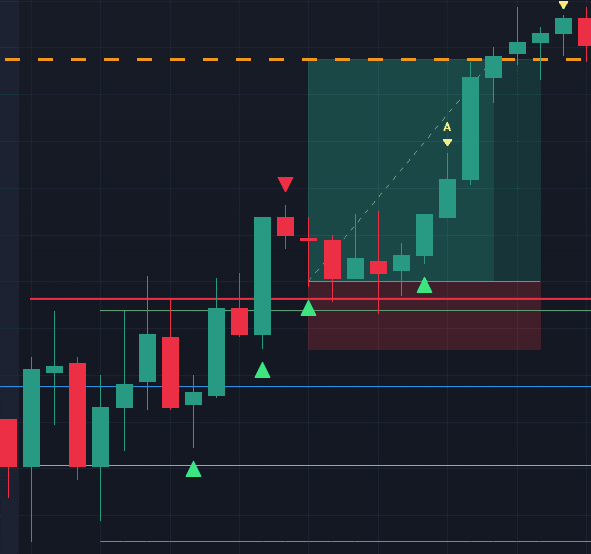
Built for practical chart decisions
The engine is designed to support the decisions traders actually make on the chart: where price is reacting, whether the bar shows pressure, and whether volume adds useful context.
Structured by software discipline
The tool is built to keep important information organized without adding unnecessary clutter. Levels, gaps, signal markers, and volume clues are grouped into one workflow so the chart stays readable.


Refined through market experience
The Price Action Engine is my flagship trading tool, refined around the areas that matter most in my own workflow: key levels, qualified pressure signals, daily gaps, and volume context.
Pricing
Choose the access option that fits your workflow
Get invite-only TradingView access to the Dobrusky Price Action Engine with either monthly access or a one-time lifetime purchase. TradingView account required.
Monthly Access
Full access to the Dobrusky Price Action Engine for traders who want the full workflow without a larger upfront cost.
Billed monthly. Renews automatically until canceled. Cancel before your next billing date to avoid renewal.
$49
$49
per month
Invite-only TradingView access
Automatic key levels and daily gap structure
Intraday reference levels
Qualified pressure signal markers
Volume anomaly context tools
Ongoing updates and improvements
Lifetime Access
Best Value
One-time purchase for long-term access to the Dobrusky Price Action Engine with no recurring monthly billing.
$599
$599
one-time payment
Invite-only TradingView access
Automatic key levels and daily gap structure
Intraday reference levels
Qualified pressure signal markers
Volume anomaly context tools
Ongoing updates and improvements
Digital product delivered through TradingView invite-only access. TradingView account required. See Terms Of Service, Refund Policy, Privacy Policy, and Risk Disclosure for full details.
Common Questions
Everything explained before you get access
Here are the key details about what the Engine does, who it is built for, and how access works.
Ready to clean up your charts?
Get the Dobrusky Price Action Engine
Map key levels, read qualified pressure signals, and use volume context in one clean TradingView workflow.

Custom Pine Script Development
Need Custom Pine Script Help?
I also take on select Pine Script projects, including bug fixes, alert updates, script cleanup, and focused custom TradingView indicators.
